
Getting started


Screening

Data extraction



Guides
Guides
How to Create a Search String for Your Systematic Review
Creating a search string is one of the most important and fundamental parts of conducting a systematic review.
You will run your search string through different databases to collect studies for your systematic review.
While it is essential for researchers to know how to create a search string, it is equally important to know that you should consult your librarian while doing so.
Most university libraries have experienced specialists and informationists who will help you create a comprehensive search string.
We'll use PubMed as an example. But the strategies can also be used in databases like Embase, Web of Science, Scopus, etc.
Say, we want to look up papers on how social media affects mental health.
1. The simplest method is to run a search using keywords, for example "social media," "mental health."
PubMed will show you a list of search results.
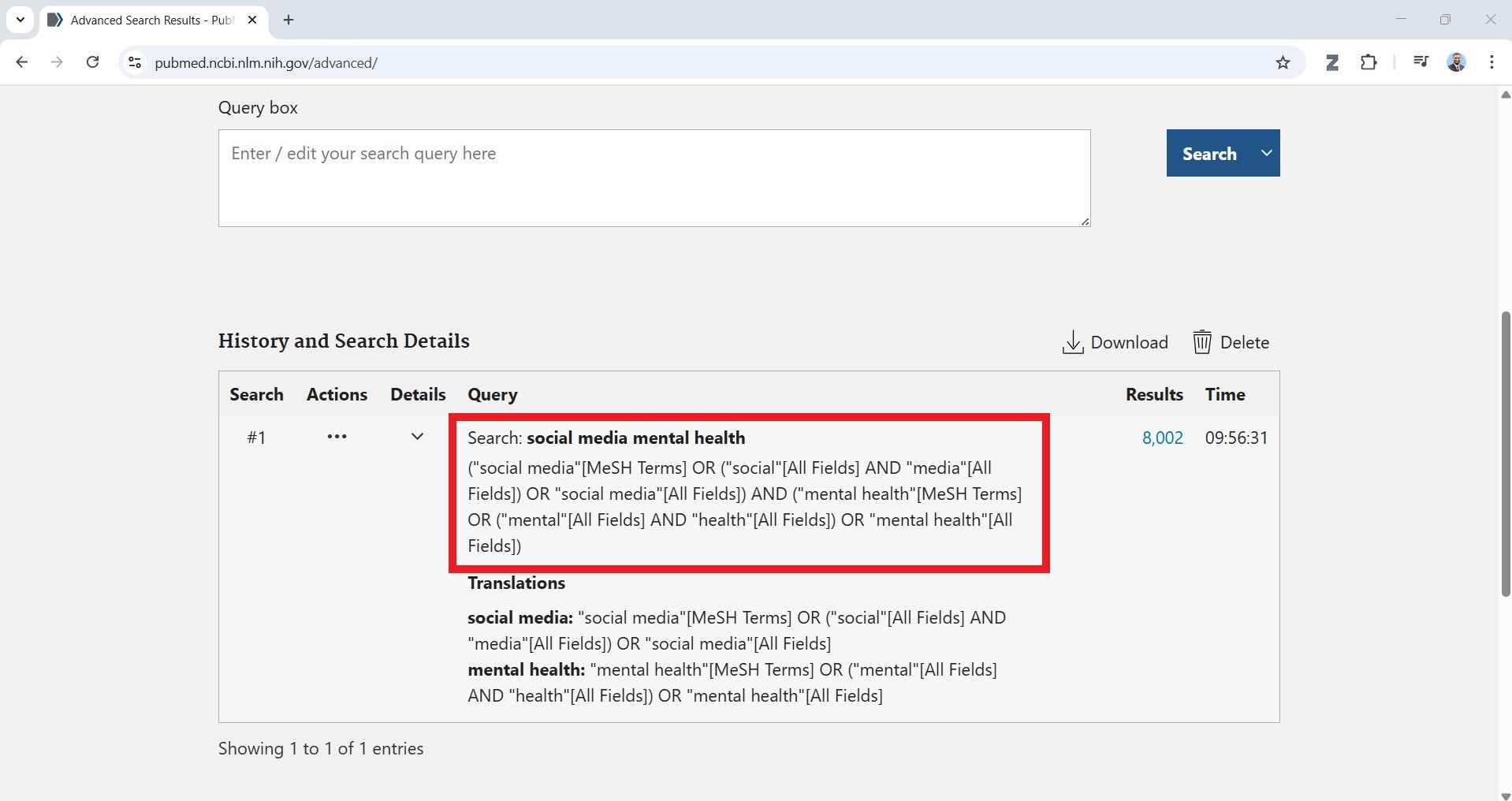
Click on "Advanced" and scroll down to "History and Search Details."
Click on the search result and it will show you the strategy PubMed used.
2. Let's look AND and OR here.
AND, OR, NOT are Boolean operators.
If we use AND, such as
social media AND mental health,
PubMed will show us articles that include both terms.
3. Adding AND between terms will decrease the number of search results.
social media AND mental health AND teenagers
4. If we use OR between terms:
social media OR digital apps OR online social platforms
the number of results increases.
PubMed will show you articles containing any of these terms.
OR is used to combine synonyms and to expand a search.
5. NOT makes the database exclude articles containing a specific term.
If you run
social media NOT Twitter
you will get articles containing the term "social media" and articles containing "Twitter" will be removed.
Pro tip: Always capitalize the Boolean operators.
6. If you use multiple ANDs and ORs to combine various terms, you will need to be careful.
If you run:
mental health AND teenagers AND social media OR smartphone OR cell phones OR blue screens
It will show you articles containing the terms
mental health and teenagers and social media
OR articles containing the word "smart phone"
OR the terms "cell phone"
OR "blue screen"
7. To make the search results precise, you will need to put the OR terms in parantheses like so:
mental health AND teenagers AND (social media OR smartphone OR cell phones OR blue screens)
This is called nesting and works similar to what we learned in high school algebra.
8. If we look up a term like "blue screen" in PubMed, you may get irrelevant results:
That's because PubMed treat "blue" and "screen" as separate terms.
9. To eliminate this problem, we will need to put double quotes around "blue screen"
10. You can also make search results precise by using truncation.
For example, you want to look up papers that mention the words
teenage, teenaged, teenager, teenagers
Instead of writing all these terms, use "teenage*" (word followed by asterisk)
and PubMed will include all variations of the word.
11. Combining all these strategies will give you a search string like:
(mental health AND teenage* AND (social media OR smartphone* OR "cell phone*")
You can see how precise the results are.
Help us get better!
Do you have suggestions for this guide or
is there anything that we can do better?

